
Home / Custom animated pair wallpapers / Black Hole
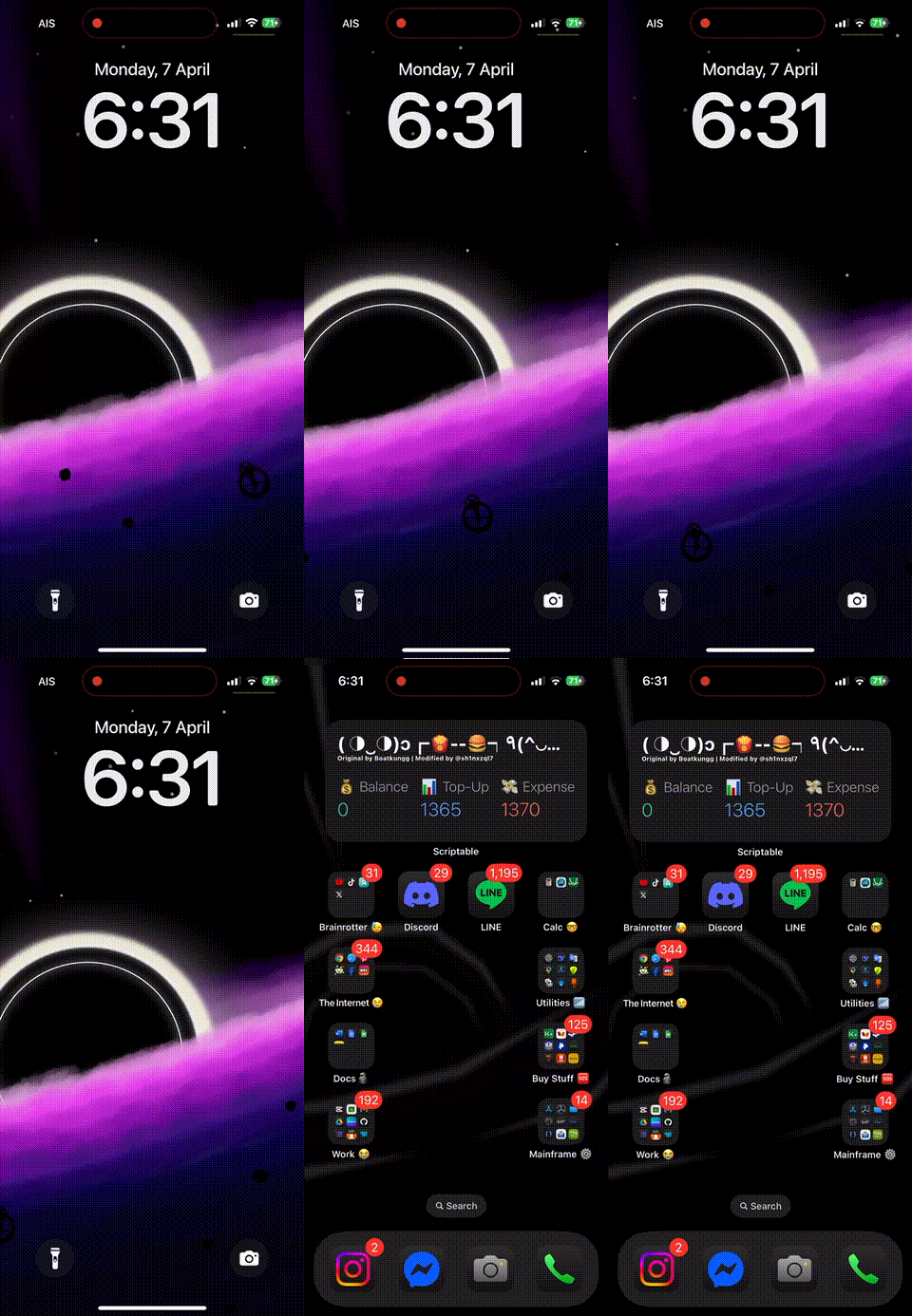
Black Hole
Updated Oct 21, 2026
- Black Hole
- Black Hole iOS 26
- Black Hole download
- iOS
- iOS 26
- Updated
- Oct 21, 2026
- Collection
- Custom animated pair wallpapers
What Is Black Hole Animated Wallpaper?
Black Hole is a custom animated wallpaper created by @i.mes for iPhone customization.
The wallpaper is part of the Nugget-compatible wallpaper collection and features a space-inspired Black Hole theme.
Unlike a normal static wallpaper, Black Hole is distributed as a custom PosterBoard wallpaper package.
The file is named BlackHole.tendies and can be imported using a compatible wallpaper installation tool.
Nugget allows users to add custom wallpapers to supported iPhones without installing a jailbreak.
After importing the wallpaper, users can select it from the available Lock Screen wallpaper collections.
Black Hole is designed for users who enjoy animated backgrounds, space themes and custom iPhone appearances.
The exact animation effects and device compatibility should be checked using the wallpaper's preview and installation information.
Black Hole is not a standalone iPhone app, jailbreak tool or IPA file. It is a wallpaper customization package.
The installation method depends on the iOS version and the capabilities of the selected Nugget release.
Opens in the members area. The account is free.
Black Hole Space Wallpaper
Give your iPhone Lock Screen a space-inspired appearance using Black Hole artwork. The design is available in the custom animated wallpaper collection.
Custom Animated Lock Screen
Black Hole uses a Nugget-compatible wallpaper package instead of an ordinary JPG or PNG image. Apply it through a supported PosterBoard customization method.
No Jailbreak Needed on Supported iOS
Compatible Nugget installations can import custom wallpapers without jailbreaking. You will need the wallpaper package, a supported device and an appropriate installation method.
How to Download and Install Black Hole Animated Wallpaper
Black Hole can be installed as a custom animated wallpaper on compatible iPhone devices using Nugget.
You need the Black Hole .tendies file, a computer and a supported iOS version.
Installation steps:
- Open the Nugget wallpaper collection.
- Search for Black Hole.
- Open the wallpaper page and check its preview.
- Download the Black Hole wallpaper package through an authorized download option.
- Save the BlackHole.tendies file to your computer.
- Visit the Nugget developer's GitHub page.
- Download a Nugget version compatible with your computer and iOS version.
- Back up your iPhone before continuing.
- Connect your iPhone to your computer using a USB cable.
- Unlock your iPhone and trust the computer if requested.
- Open Nugget and select the PosterBoard wallpaper section.
- Import the BlackHole.tendies file.
- Follow Nugget's instructions to apply the wallpaper.
- Allow the device to restart if requested.
- Open Settings → Wallpaper on your iPhone.
- Find the imported Black Hole wallpaper in the available collections.
- Select the wallpaper and apply it to your Lock Screen.
Can I install Black Hole without a computer?
The documented Nugget method requires a computer to import the wallpaper package.
Other tools may provide different installation methods, but they have not been individually verified for this Black Hole wallpaper.
Important: Do not use the original Nugget restore method on iOS 27. The developer warns that it may cause data loss.
Always back up important data before applying system-level wallpaper changes.
Black Hole Wallpaper Features and Supported iOS Versions
Black Hole is a custom animated wallpaper created for the Nugget wallpaper collection.
Space-Inspired Black Hole Design
The wallpaper provides a black-hole-themed appearance for users who enjoy space and animated Lock Screen designs.
Animated Wallpaper Package
Black Hole is listed as a custom animated wallpaper rather than a normal static image.
PosterBoard Wallpaper Format
The wallpaper uses the .tendies file format, which stores the information needed to import a custom PosterBoard wallpaper.
Custom Lock Screen Appearance
After successful installation, the wallpaper can appear in the iPhone wallpaper collections and be selected for the Lock Screen.
No Standalone App
Black Hole does not require a separate Black Hole IPA application. It is a wallpaper package used with a compatible customization tool.
Supported iOS Versions
Nugget's developer lists PosterBoard customization support for iOS 17.0–26.0+.
- iOS 17: Within Nugget's advertised support range.
- iOS 18: Within Nugget's advertised support range.
- iOS 26: Selected versions are supported by Nugget.
- iOS 27: Do not use the original Nugget method because of the developer's data-loss warning.
These are Nugget compatibility details. The Black Hole wallpaper has not been individually confirmed to work on every version.
Supported Devices
Compatible iPhones running a supported version of iOS may be able to install Black Hole. Individual device testing has not been confirmed.
iPad Compatibility
Nugget supports PosterBoard customization on compatible iPads, but a separate Black Hole iPad compatibility list has not been verified.
Important: A compatible Nugget version does not guarantee that every animated wallpaper will work on every device.
Black Hole Animated Wallpaper Troubleshooting and Common Problems
If Black Hole is not downloading, importing or displaying correctly, check these common problems.
Black Hole Wallpaper Is Not Downloading
Open the wallpaper gallery and confirm that you have access to its download option. The gallery currently lists Black Hole as premium.
Cannot Find BlackHole.tendies
Check your computer's Downloads folder and confirm that the downloaded file is the correct wallpaper package.
Nugget Is Not Detecting iPhone
Check your USB cable, unlock the device and trust the computer when requested.
Black Hole Is Not Importing
Confirm that you selected the .tendies package rather than its preview image.
Wallpaper Is Not Showing in Settings
Check whether Nugget completed the import. Follow the restart instructions and check the Wallpaper collections again.
Black Hole Animation Is Not Working
Confirm that the wallpaper is correctly imported and that your iOS version supports the required animation.
Black Hole Is Not Working on iOS 17
Although iOS 17 is within Nugget's supported range, the wallpaper itself may have additional requirements.
Black Hole Is Not Working on iOS 26
Check your exact iOS version and Nugget release. Not every iOS 26 build or device configuration has the same compatibility.
Nugget Is Not Working on iOS 27
Do not force the installation. The original Nugget developer warns that using its partial-restore method on iOS 27 may cause data loss.
Wallpaper Preview Is Not Opening
Check your internet connection and try opening the wallpaper gallery again.
How to Remove Black Hole Wallpaper
Open Settings → Wallpaper and select another wallpaper. This changes your active wallpaper but may not remove the imported package.
Safety Tips
Back up your iPhone before using Nugget. Download files from trusted sources, check the exact firmware requirements and avoid unsupported restore operations.
FAQ
What is Black Hole animated wallpaper?
Black Hole is a custom animated iPhone wallpaper created by @i.mes for the Nugget-compatible wallpaper collection.
Who created Black Hole wallpaper?
Black Hole is credited to @i.mes in the community wallpaper catalog.
How do I download Black Hole wallpaper?
Open the Nugget wallpaper collection, search for Black Hole and use its authorized download option.
Is Black Hole wallpaper an IPA app?
No. Black Hole is a custom animated wallpaper package, not a standalone IPA application.
What is the Black Hole wallpaper file format?
Black Hole uses the .tendies format. Its package filename is BlackHole.tendies.
Does Black Hole work with Nugget?
Black Hole is included in the Nugget-compatible wallpaper collection. Successful installation depends on firmware and tool compatibility.
Does Black Hole require a jailbreak?
The compatible Nugget method does not require a jailbreak, although it modifies wallpaper-related system data.
Can I install Black Hole without a computer?
The documented Nugget installation method requires a computer. Other installation methods have not been independently verified for this wallpaper.
Does Black Hole support iOS 17?
iOS 17 is within Nugget's advertised support range, but Black Hole has not been separately tested on every iOS 17 device.
Does Black Hole support iOS 18?
Nugget supports PosterBoard customization on selected iOS 18 devices. Exact Black Hole compatibility depends on the installation setup.
Does Black Hole support iOS 26?
Selected iOS 26 releases are supported by Nugget, but the Black Hole wallpaper has not been individually tested on every firmware.
Does Black Hole support iOS 27?
Do not use the original Nugget method on iOS 27. The developer warns that Apple's patch can cause data loss during the restore process.
Can I use Black Hole on iPhone 15?
Potentially, if the installed firmware and Nugget version are compatible. The wallpaper's exact iPhone 15 compatibility has not been verified.
Can I use Black Hole on iPhone 16?
Support depends on the iOS version and installation method. Check Nugget compatibility before trying it.
Can I install Black Hole on iPad?
Nugget supports selected iPads, but Black Hole's individual iPad compatibility has not been confirmed.
Is Black Hole a live wallpaper?
Black Hole is listed as a custom animated wallpaper. Its animation depends on the supported PosterBoard system.
Does Black Hole change the Lock Screen?
Yes, on a successful installation, users can select the imported wallpaper for their Lock Screen.
Does Black Hole change my app icons?
No. Black Hole is a wallpaper design. It does not replace apps, icons or system settings.
Why is Black Hole not showing after installation?
The wallpaper may not have imported correctly, or your device may not support the required customization method.
Why is the Black Hole animation not working?
The animation may depend on the selected iOS version, wallpaper package or PosterBoard support.
How do I remove Black Hole wallpaper?
Go to Settings → Wallpaper and select another wallpaper. Removing the imported package itself may require additional steps.
Is Black Hole wallpaper safe?
The artwork is a wallpaper package, but installing it through Nugget modifies system data. Back up your iPhone and follow the developer's compatibility warnings.
What is the difference between Black Hole and Cat Volleyball wallpapers?
Black Hole is a space-inspired animated wallpaper created by @i.mes. Cat Volleyball is a separate animated wallpaper created by @c4ndyf1sh.
Is Black Hole wallpaper available as a PNG?
The verified custom wallpaper listing provides a .tendies package and a GIF preview. A separate static PNG download was not verified.
Is Black Hole wallpaper a game?
No. Black Hole is a custom iPhone wallpaper, not an App Store game or standalone application.