
Impactor – Advanced Open-Source iOS Sideloading Tool (Full Guide)
Impactor v2.1.0 is a major update to the open-source iOS sideloading ecosystem. This release introduces App Icon customization, entitlement editing, improved device detection, and numerous bug fixes while keeping advanced features completely free.
If you are searching for:
iOS sideloading without jailbreak
Sideloadly alternative free
App icon customization iOS sideload
Entitlement injection iOS
Cross-platform IPA signer
SideStore / LiveContainer support
This guide covers everything in depth.
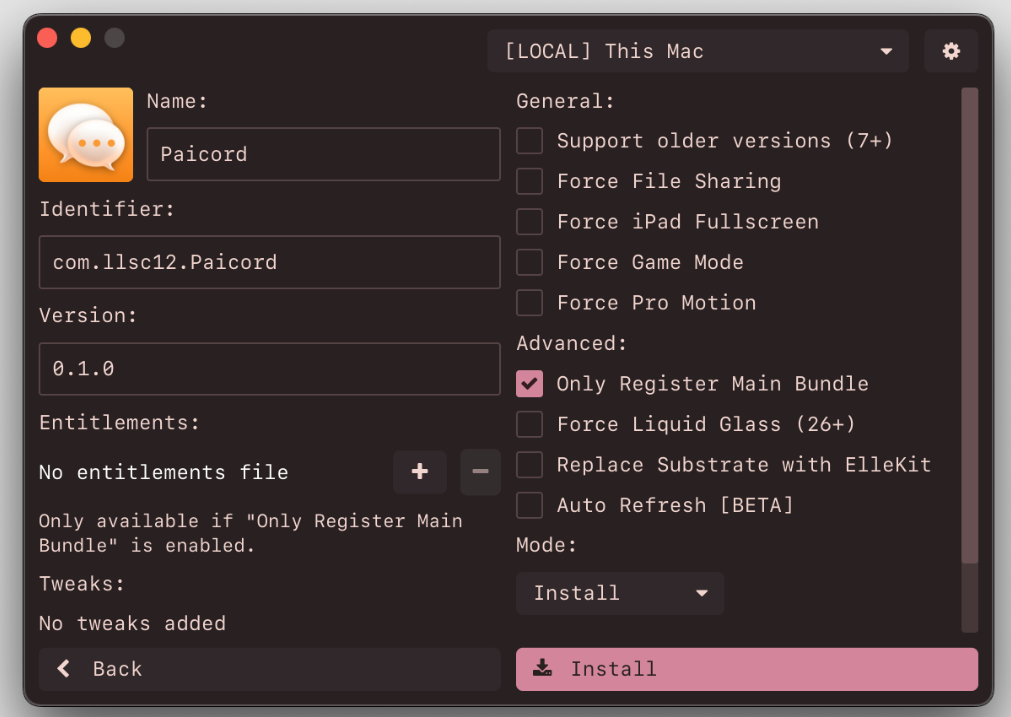
What Is an Impactor?
Impactor is a cross-platform, open-source iOS sideloading application that allows users to sign and install IPA files using their Apple ID without requiring a jailbreak.
It works by replicating Apple’s Xcode signing process using your Apple account credentials to:
Request developer certificates
Generate provisioning profiles
Register devices
Sign IPA files
Install directly to iPhone / iPad
Supported Platforms:
macOS
Linux
Windows
Supported iOS Versions:
iOS 9.0 and above
Compatible with the latest iOS 26 versions including iOS 26.3 /iOS 26.2.1 / iOS 26.2 to iOS 26
What’s New in Impactor v2.1.0
This is one of the most meaningful updates so far.
1️⃣ App Icon Customization (Free)
Unlike some tools that lock this behind subscriptions, Impactor allows:
Changing app icons before signing
Rebranding sideloaded apps
Creating duplicate versions of apps visually
This is extremely useful for:
Emulators
Testing environments
Modified builds
Multiple accounts
2️⃣ Entitlement Editing Support
Impactor now supports:
Editing and injecting custom entitlements
Requesting special entitlements such as:
increased-memory-limit
Emulator-required permissions
Plugin registration support
This makes it ideal for apps like:
UTM
MelonX
Advanced entitlement handling is critical for emulator and virtual machine apps.
3️⃣ Improved Device Detection
Auto-refresh detection system has been reworked, solving:
Device not appearing issues
Pairing instability
USB detection errors
4️⃣ ElleKit Injection Support
Impactor replaces legacy Cydia Substrate with:
ElleKit
This ensures compatibility with modern iOS versions including iOS 26.0+.
Core Features (Deep Breakdown)
✔ Clean & User Friendly Interface
Designed for:
Beginners who want simple IPA installs
Advanced users requiring tweak injection
✔ SideStore & LiveContainer Support
Impactor properly supports:
SideStore
LiveContainer
Including:
P12 export generation
Automatic pairing file population
Certificate management
✔ Linux Support (Rare in iOS Tools)
Most iOS signing tools are macOS or Windows only.
Impactor supports Linux natively, including:
Flatpak distribution
Homebrew installation for macOS
Example:
brew install --cask impactor
✔ IPA Signing & Installation
Supports:
Apple ID signing
AppSync installation
ipatool downloaded IPAs
Plugin registration
Bundle injection
Framework injection
.deb and .dylib injection
You can:
Inject tweaks
Modify binary behavior
Add extensions (.appex)
Replace frameworks
Register plugins properly
✔ Automatic App Store Update Blocking
Prevents accidental overwriting of sideloaded apps by:
Disabling App Store updates for modified builds
How Impactor Works (Technical Overview)
Impactor mimics the official Apple developer pipeline.
Step 1: Device Registration
Register your iPhone/iPad with Apple servers.
Step 2: Certificate Creation
Requests signing certificates from Apple using your Apple ID.
If free account:
Certificate valid 7 days
Limited number of apps
If paid developer account:
365-day validity
Private keys are stored locally. Moving machines requires copying keys.
Step 3: App Registration
Registers Bundle ID with Apple.
Step 4: Entitlement Gathering
Reads entitlements from the app binary.
Step 5: Provisioning Profile Creation
Provisioning profile is generated and downloaded.
Step 6: App Modification
Possible modifications include:
Name change
Icon change
Entitlement modification
Tweak injection
Framework injection
ElleKit integration
Step 7: Signing
Uses:
apple-codesign-rs
idevice installation tools
Finally installs directly to device.
Pairing File Feature (Power Users)
Impactor can generate a device-specific pairing file.
This allows certain apps to communicate directly with your device.
⚠️ Important:
Pairing files become invalid if:
You reset the device
You update iOS
You re-trust computer
Supported Pairing File Apps
SideStore
Feather
SparseBox
LiveContainer
Antrag
Protokolle
StikDebug
EnsWilde
ByeTunes
Why Impactor Over Sideloadly?
Many users search:
Sideloadly alternative
Free sideloading tool
App icon customization without Patreon
Key Advantages:
100% open-source
App icon editing free
Entitlement editing free
Linux support
Advanced tweak injection
Pairing file generation
Modern ElleKit support
Who Should Use an Impactor?
Developers
Testing builds without full Xcode workflow
Entitlement experimentation
Emulator deployment
Jailbreak Users
Inject tweaks with ElleKit
Replace Substrate
Emulator Users
Increased memory entitlements
Plugin registration
Custom builds
Power Users
Multiple app clones
Custom icons
Advanced IPA modification
Limitations
Free Apple IDs limited to 7 days
Limited registered apps/components
Requires trusting computer
Pairing invalidated after reset
These are Apple restrictions, not Impactor limitations.
Installation & Download
Available via:
Official releases page
Flatpak (Linux)
Homebrew (macOS)
macOS install:
brew install --cask impactor
FAQ Section
What is Impactor v2.1.0?
An open-source cross-platform iOS sideloading tool supporting IPA signing, tweak injection, entitlement editing, and pairing file generation.
Does Impactor support iOS 26?
Yes, including ElleKit compatibility and entitlement handling improvements.
Is App Icon customization free?
Yes. Unlike some competitors, it is not paywalled.
Can Impactor inject tweaks?
Yes. Supports:
.deb
.dylib
.framework
.bundle
.appex
Does Impactor support SideStore?
Yes, including P12 export and pairing automation.
Is it safe?
It uses official Apple certificate mechanisms. However, users should always review open-source code and understand signing limitations.
Final Verdict
Impactor v2.1.0 is no longer just a basic IPA signer. It has evolved into:
A development-grade signing tool
A tweak injection platform
A pairing file generator
A SideStore companion
A Linux-supported sideloading solution
For users looking for:
Free advanced sideloading
App icon customization
Entitlement injection
Cross-platform IPA signing
Impactor is currently one of the most feature-rich open-source tools in the iOS ecosystem.